
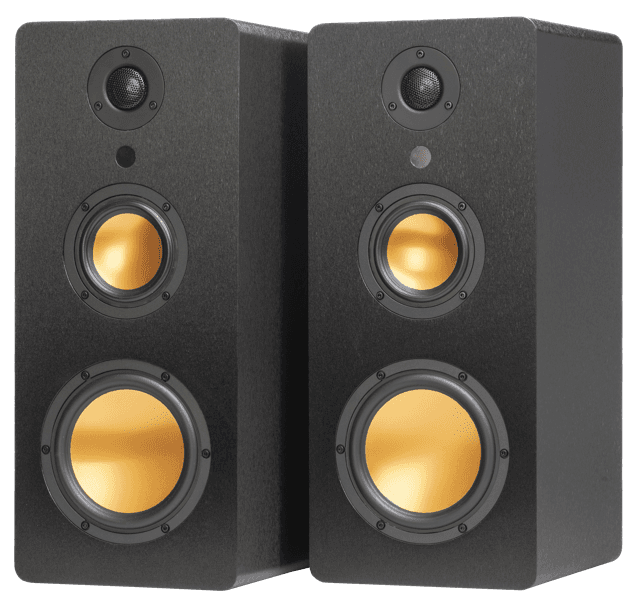
A large TV suits a stereo pair spaced to roughly the width of the screen, so voices and effects seem to come from the picture rather than from a spot in front of it. Connect the pair by HDMI ARC, choose speakers with enough RMS power for the size of the room, and set one either side of the TV at about ear height. That is simpler than most surround kits.
Why does a large screen need more than its built-in sound?
Screens have got bigger while the cabinet around the speakers has got thinner. The picture fills your view, but the sound still comes from small drivers in a slim frame, often facing down or backwards. Our guide to the best kind of speakers for a TV covers what to look for in general. This article is about what changes when the screen is big.
How far apart should speakers be for a large TV?
Start with one speaker just outside each edge of the screen. As a guide, a 16:9 screen is about 122cm wide at 55 inches, 144cm at 65 inches and 166cm at 75 inches, so a pair spread to the width of the TV already sits a good distance apart.
Then check it against where you sit.
Match the spacing to your seat. A common starting point is a listening seat about as far from the pair as the speakers are apart. If your sofa is much closer than that, the sound can feel spread out with a thin middle.
Do not spread them far beyond the screen. Wide spacing opens up the sound, but too much leaves a gap where dialogue should be.
Adjust by ear. Move each speaker a little and play something with a clear spoken voice. When the voice sits in the middle of the picture, you are close.
Our article on setting up for a better centre image goes deeper on that centre point.
How should you connect speakers to a large TV?
Use HDMI ARC first if your TV has it. One cable carries the sound from the TV to the speakers, and the TV remote can usually control the volume. Optical is the fallback when there is no ARC port, and our guide to HDMI ARC or optical explains the differences and what to try when there is no sound.
uStream Three, uStream Two, uStream One and uStream Cube all connect to a TV through HDMI eARC, and uStream One, uStream Two and uStream Three also have an optical input. On uStream Two and uStream Three, all the inputs are on the left speaker, so put that one on the side nearest your TV connections. uStream Cube has no cable between the two speakers, which gives more freedom on where each one goes.
How much power does a bigger screen need?
A big screen often means a bigger room, a longer seating distance, or both. More distance and more volume ask more of a speaker, so you want power in reserve rather than a speaker working flat out. Always compare power as RMS, which is what the speaker can sustain, rather than peak figures. Our explainer on RMS against peak watts shows why.
For reference, the uStream range is rated at 70W RMS for uStream Cube, 100W RMS for uStream One, 160W RMS for uStream Two and 240W RMS for uStream Three. Each uStream Three cabinet stands 500mm tall. Power is only part of the picture, and our guide to what size speakers you need for your room looks at driver and cabinet size too.
Where should the speakers sit beside a large TV?
Tweeters near ear height when you are seated. A big TV on a low unit often leaves the speakers too low, so a stand or sturdy sideboard can help. If the TV is wall mounted high, keep the speakers lower than the screen rather than level with it.
Clear of obstructions. A speaker behind a cabinet door or pushed into a shelf will sound muffled.
Away from corners. Corners boost the bass and can make it boomy.
A slight angle towards your seat. A gentle turn inwards often focuses voices.
Our guide to where speakers should be placed has more on positioning in real rooms, and our comparison of stereo against a soundbar explains why a pair gives you proper left and right.
Frequently asked questions
Do I need a sound system for my TV?
Not strictly, but a slim TV rarely sounds as good as its picture looks. External speakers, especially a stereo pair either side of the screen, usually make speech clearer and music fuller.
What is a good TV sound system for a big screen?
A pair of powered speakers, spaced to about the width of the screen, connected by HDMI ARC. Choose enough RMS power for your room and place them at ear height.
Why are TV speakers so bad?
Thin cabinets leave little space for drivers and enclosures, and the speakers often point away from you. That limits bass and makes voices less clear.
Why is the music louder than the voices on my TV?
Many soundtracks mix speech quietly against loud music and effects. Check your TV for a dialogue or night mode, and set the speakers up as a matched pair so voices have a clear centre.
Follow Mitchell Acoustics on Facebook, Instagram, YouTube, X, Threads, Pinterest, LinkedIn and TikTok for new uStream guides, setup films and listening tips.

